
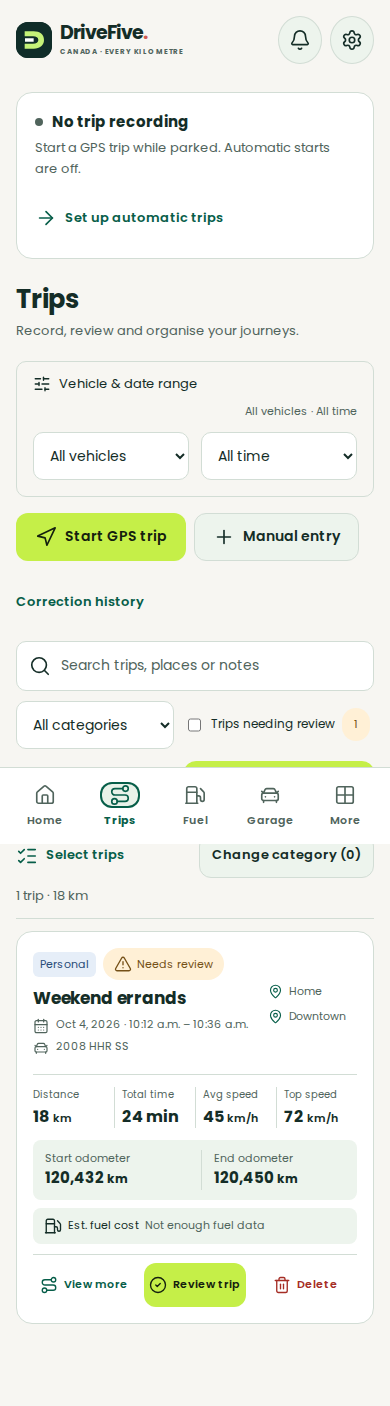
Before the first pickup: choose the right vehicle
Start while safely parked. Select the vehicle you will drive and compare its saved odometer with the dashboard. If you share a household car or switch between a car and van, this small check keeps the day’s trips, fuel and service records attached to the right vehicle.
Choose a recording method before leaving. In DriveFive, you can start a GPS trip yourself, enable movement-based automatic logging, use an assigned NFC tag or set up an Android Auto connection start. A manually entered log remains an option when you prefer dashboard readings or do not want GPS.
- Check the visible recording or monitoring status rather than assuming an open app is recording.
- Record a specific purpose such as “Collect parcel for local delivery.” Add the actual destinations as you review each journey.
- If using automatic logging, choose a stop delay that suits your work and test it on a short journey.
- Set up your phone and review records while parked. Driving comes first.
A delivery shift with a personal detour
Here is a fictional example using one vehicle. The starting odometer is 120,000 km. Each row has a distinct destination and reason, so the personal stop stays visible. The labels illustrate record organization; whether any journey qualifies for a claim depends on the actual circumstances.
| Journey and purpose | Odometer readings | Distance | Category to review |
|---|---|---|---|
| Depot to customer: deliver parcel | 120,000 to 120,012 | 12 km | Business |
| Customer to next pickup: collect parcel | 120,012 to 120,019 | 7 km | Business |
| Personal errand: detour to shop | 120,019 to 120,022 | 3 km | Personal |
| Pickup to customer: complete delivery | 120,022 to 120,031 | 9 km | Business |
The odometer increased by 31 km. The rows labelled Business add to 28 km, with 3 km recorded separately as Personal. This is a distance example, not a deduction calculation. The start and end of a work shift also do not replace the beginning and ending odometers for your full reporting period.
Do not mark an entire day as business simply because a delivery platform was open. Record the actual purpose of travel, including personal detours, and check how travel to the first pickup or home after work applies to your circumstances. If a journey is uncertain, keep its facts and ask your accountant how it should be treated.
Make short stops easy to explain later
Automatic tracking detects movement and stops; it cannot recognize the business reason for a delivery. A short stop delay may save several separate journeys, while a longer delay can keep a chain of stops in one recording. Either way, review the destinations and purposes so the record remains understandable.
A single note saying “deliveries” can be difficult to interpret months later. Keep enough detail to identify the work without copying customer phone numbers, medical information or other unnecessary personal details. If one recorded trip combines work and personal driving, use the trip review and correction tools to make that distinction clear.
Use the vehicle and date filters in Trips, then open records that need review. Confirm the odometers, endpoints, category and purpose. Investigate a GPS gap against your dashboard and other reliable records rather than assuming the displayed route contains every kilometre.
Keep fuel and receipts with the same vehicle
Mileage is only one part of the paperwork. Log fuel fill-ups with litres, the odometer and the amount paid. Keep parking, tolls, repairs and other vehicle expenses with their receipts. DriveFive also supports charging records for electric vehicles, so you can keep the costs relevant to the vehicle you actually drive.
A fuel estimate on a trip card helps explain a journey’s estimated fuel use when suitable prior records exist. It is not another purchase. DriveFive does not add that estimate to your expense records, which avoids treating the same fuel as a second receipt.
For self-employed drivers who use a vehicle personally as well as for business, the CRA explains the business portion of vehicle expenses separately from employee allowance rules. Keep the supporting distance and expense records first. Do not multiply all driving by an advertised per-kilometre allowance and assume it is your self-employed deduction.
An end-of-shift routine you can repeat
- Finish the active trip when parked and check the end odometer.
- Review journeys with missing information or an uncertain category. Explain the purpose while it is still familiar.
- Record the day’s fuel, charging, parking or other expenses and attach the relevant receipts.
- Check that a personal errand has not remained inside an undifferentiated business record.
- At the end of your chosen reporting period, select the vehicle and dates in Reports & exports, then save a mileage CSV or PDF.
- Open the exported file and check its scope. Keep a separate full backup of the garage and attachments.
DriveFive reports include all matching records for the selected vehicle and dates, even when the preview shows only a limited number of rows. Filters used elsewhere in the app do not automatically narrow the report. Check the exported categories before sharing it with an accountant or employer.
Start with your next real journey
You do not need to build a complicated bookkeeping system to start keeping better records. Add your vehicle, choose a recording method and make the next journey clear. DriveFive keeps your mileage, fuel, expenses and maintenance in one place, with Canadian units, English and Canadian French, and exports you can keep outside the app.
The app does not connect to your delivery-platform account or import its earnings. You remain in control of the records you enter and review. There is no DriveFive account to create, and garage records stay on your phone; keep a backup somewhere safe.
USE IT IN DRIVEFIVE
Your next step
Open the matching guide for the exact steps in the app.
- Configure automatic GPS trip logging
- Review and correct trip records
- Record vehicle expenses and receipts
- Export the selected vehicle and date range
Sources & app documentation
- CRA: Motor vehicle records
- CRA: Motor vehicle expenses for business income
- DriveFive: automatic GPS trip logging
- DriveFive: analytics, reports and exports
Published by DriveFive · App instructions checked against version 1.24.0. Read our editorial approach.