
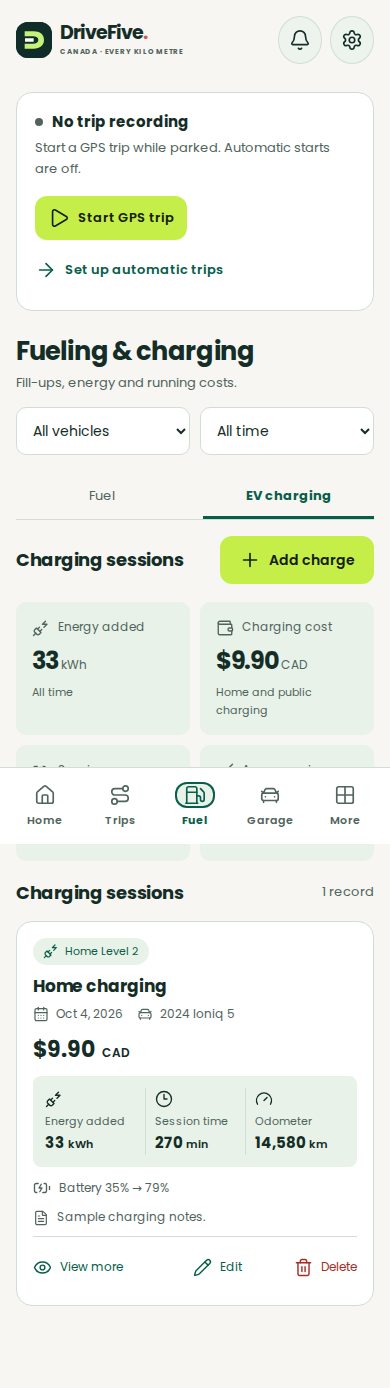
Record the facts of each charging session
For each session, identify the vehicle, date, dashboard odometer, energy delivered in kWh and actual charging total in Canadian dollars. Those five facts let you answer practical questions later: which vehicle was charged, how much energy was added, what it cost and where the vehicle was in its driving history.
Add the charger type, starting and ending battery percentages, duration, charging network, receipt and a short note when they help explain the entry. Battery percentages describe what the vehicle displayed; they do not replace the delivered-energy figure on a charger or receipt. If a session was genuinely free, record zero rather than treating a missing amount as free.
Use the vehicle's actual dashboard odometer, not a distance copied from a trip estimate. When more than one EV is in the garage, check the vehicle before saving so one car's electricity and costs do not appear in the other's history.
Treat home and public charging costs honestly
For home charging, use your own applicable electricity information and a consistent method. Natural Resources Canada notes that the additional cost of charging at home appears on the electricity bill. Rates, time-of-use periods, delivery charges and charger information vary, so DriveFive does not fetch a utility tariff or invent a home-charging total.
For public charging, copy the actual session total from the charger, network app or receipt. Measurement Canada explains that Canadian charging may be billed by energy, time or a flat fee, and may also be free or included with another service such as parking. That is why the amount paid can matter even when the kWh figure is the same.
Example: one home session and one public session
The following figures are fictional recordkeeping examples in Canadian dollars, not current electricity or network prices. They show how to keep energy, charging cost and a separate parking fee from being counted twice.
| Field | Home Level 2 | Public charger |
|---|---|---|
| Date and odometer | October 4, 2026 · 14,580 km | October 12, 2026 · 14,925 km |
| Energy delivered | 33.0 kWh | 22.4 kWh |
| Charging total | $9.90 | $14.75 |
| Duration | 270 minutes | 48 minutes |
| Battery reading | 35% to 79% | 28% to 64% |
| Separate parking expense | None | $3.00 |
For a manual check, the home example is $9.90 ÷ 33.0 kWh = $0.30 per kWh under the method used for that example. It is not a suggested Canadian electricity rate. The public session keeps its $14.75 charging total in the charging record and its separately billed $3.00 parking charge in Expenses. If the parking was already included in the charging total, do not enter it again.
A note such as “Home Level 2; total based on this month's applicable household electricity information” or “Public network receipt; parking billed separately” makes the calculation easier to understand months later. Keep the supporting bill or receipt according to your own recordkeeping needs.
Add an EV charging session in DriveFive
- While parked, open Fuel, choose the EV charging tab and tap Add charge.
- Confirm the vehicle and date, then enter the whole-kilometre dashboard odometer.
- Enter the energy delivered in kWh and the actual total paid in CAD.
- Choose the charger type. Add starting and ending battery percentages, duration, network, receipt and notes when known.
- Save the entry, then open View more and compare the vehicle, date, kWh, cost and odometer with the source record.
DriveFive stores a charging session as its own record. It does not turn electricity into a fuel fill-up, fetch a home tariff or create an expense from an estimate. Attach a clear receipt when useful, but keep the original document separately if you require its original quality.
Keep charging separate from parking and other vehicle costs
- Use a charging record for delivered kWh, charger details and the charging amount.
- Use Expenses for separately billed parking, tolls, insurance, registration, tires, financing and other running costs.
- Put a combined amount in only one place. If one receipt bundles charging and parking and cannot be separated, explain the bundle in the note instead of duplicating it.
- Attach each receipt to the record it supports and confirm the right vehicle before saving.
This separation keeps the record useful without pretending that recorded charging is the complete cost of owning the vehicle. Missing service, insurance or other entries make totals incomplete; they do not become zero automatically.
Review the period and export a charging report
- Choose the intended vehicle and date range before reading charging totals.
- Open More → Reports & exports and select Charging records.
- Choose CSV for row-by-row data or PDF for a formatted report.
- Open the saved file and check the vehicle, dates, sessions, kWh, costs and any missing values against your records.
- Keep a separate full DriveFive backup if you also need recovery of the garage, attachments and settings.
The on-screen preview may show only a limited number of rows, while the generated charging report includes all matching records for the selected vehicle and dates. Search and category filters on other screens do not narrow the report. Blank or missing information remains unknown rather than becoming zero.
The practical routine is simple: capture the session from a reliable source, keep bundled and separate fees clear, review the saved entry, and export the period you actually need. The result is a charging log you can explain without mixing electricity, parking and gasoline.
USE IT IN DRIVEFIVE
Your next step
Open the matching guide for the exact steps in the app.
Get DriveFiveSources & app documentation
- Natural Resources Canada: costs of EV charging
- Measurement Canada: electric vehicle charging stations
- DriveFive: fuel and vehicle expenses
- DriveFive user guide: EV charging, expenses and receipts
Published by DriveFive · App instructions checked against version 1.26.4. Read our editorial approach.